> ## Documentation Index
> Fetch the complete documentation index at: https://withfew.app/docs/llms.txt
> Use this file to discover all available pages before exploring further.
# What Few never touches
> The tabs Few leaves alone, and how to add your own.
Few is only useful if it never takes away something you needed. Several things
are protected without you doing anything.
## Protected by default
| | Why |
| -------------------------------------------- | ------------------------------------------------------------ |
| The tab you are looking at | You are using it |
| Pinned tabs | You pinned it on purpose |
| Tabs playing audio | Something is running |
| Tabs in groups you made | Your groups are yours to organise — unless you hand one over |
| Sites you protect | You said so — see below |
| Blank, new-tab, settings and extension pages | Not worth managing |
The last three switches are per step, so you can change them for one action
without changing the rest. Open a step in the editor to see them.
One more thing is always protected: a page that looks private — banking,
health, account security, a personal document — may still move into Bin, but
Few never closes it from there. Few works that out on your device; see
[How Few understands your tabs](/docs/guides/grouping).
## Protecting a site
Two ways:
* **From the popup.** Hover a tab in the Bin list and choose **Protect site**.
The tab comes back out of Bin immediately.
* **From Settings** in the editor. Type a domain and press Protect.
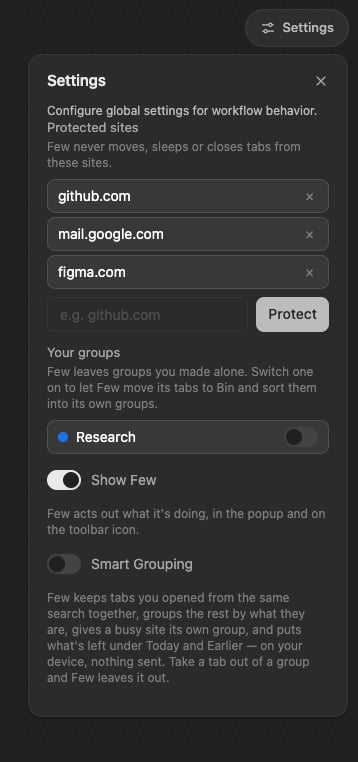 Protection is by hostname, so protecting `github.com` covers every page on it.
## Your groups, and Few's
Few leaves every group you made alone. **Settings → Your groups** lists them,
each with a switch, all off to start with.
Switch one on and Few may move its tabs to Bin and sort them into its own
groups — the same as a loose tab. Switch it off again and Few stops.
The groups Few makes itself are named plainly: **Docs**, **Recent**, **Bin**.
Few keeps its own record of which groups it made, so a group of yours that
happens to share a name with one of Few's is still yours. If you rename one of
Few's groups, Few takes that as the group now being yours, and leaves it alone.
Few only recognises the groups it made while it can match them up. After a
browser restart it re-finds them by name, colour and the tabs inside; any it
cannot be sure of are treated as yours. The worst case is a group Few made
that it no longer touches, never one of yours that it takes.
## Turning Few off for a while
The switch in the popup stops the engine entirely. Nothing is moved or closed
while it is off, and anything already in Bin stays exactly where it is.
Few also stops on its own when a trial or subscription ends. It looks
different in the popup, and it is explained in
[Your account](/docs/guides/account).
Protection is by hostname, so protecting `github.com` covers every page on it.
## Your groups, and Few's
Few leaves every group you made alone. **Settings → Your groups** lists them,
each with a switch, all off to start with.
Switch one on and Few may move its tabs to Bin and sort them into its own
groups — the same as a loose tab. Switch it off again and Few stops.
The groups Few makes itself are named plainly: **Docs**, **Recent**, **Bin**.
Few keeps its own record of which groups it made, so a group of yours that
happens to share a name with one of Few's is still yours. If you rename one of
Few's groups, Few takes that as the group now being yours, and leaves it alone.
Few only recognises the groups it made while it can match them up. After a
browser restart it re-finds them by name, colour and the tabs inside; any it
cannot be sure of are treated as yours. The worst case is a group Few made
that it no longer touches, never one of yours that it takes.
## Turning Few off for a while
The switch in the popup stops the engine entirely. Nothing is moved or closed
while it is off, and anything already in Bin stays exactly where it is.
Few also stops on its own when a trial or subscription ends. It looks
different in the popup, and it is explained in
[Your account](/docs/guides/account).