> ## Documentation Index
> Fetch the complete documentation index at: https://withfew.app/docs/llms.txt
> Use this file to discover all available pages before exploring further.
# Workflows
> Change what Few does and when, in the editor.
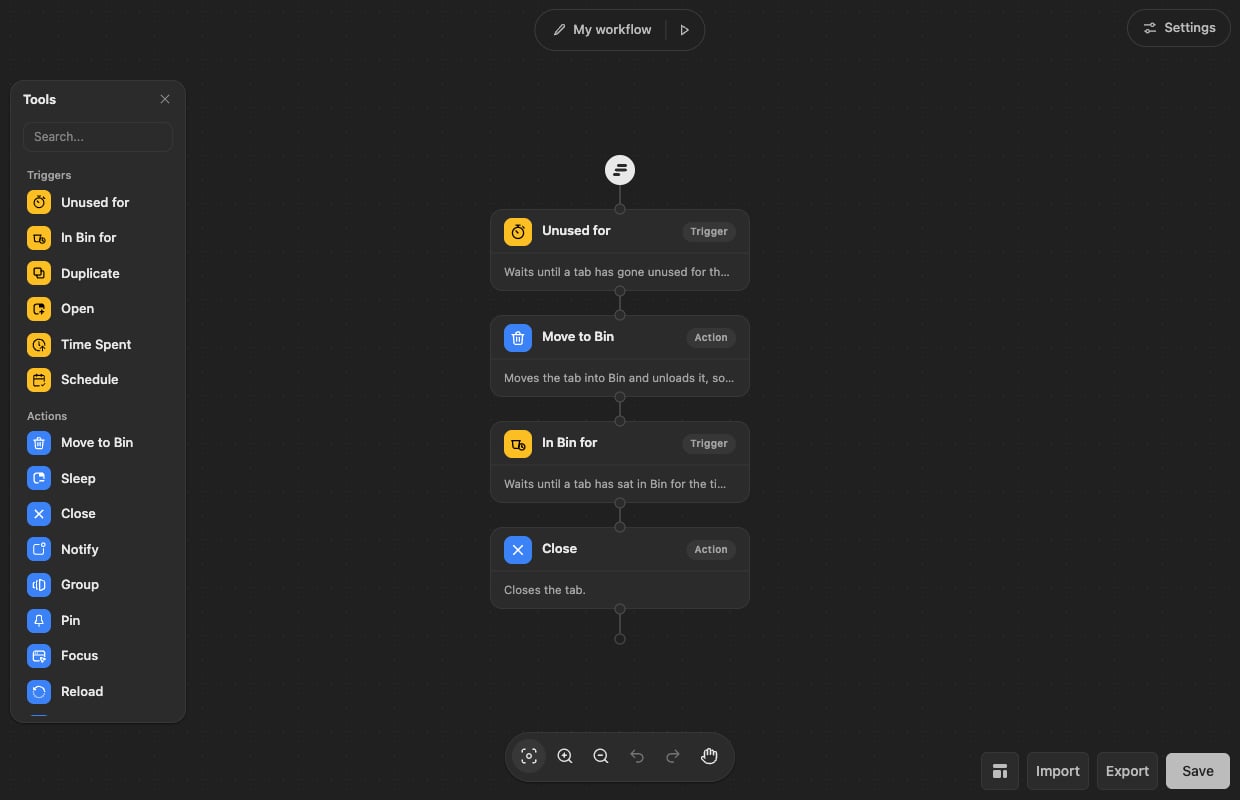
Few's behaviour is a workflow: a chain of triggers and actions. The default one
is four steps, and reads as a sentence — *unused for 3 hours → move to Bin → in
Bin for five days → close*.
Open it with **Rules** in the popup, or right-click the Few icon and choose
Options.
 ## Changing a step
Click a step and its settings open beside it.
## Changing a step
Click a step and its settings open beside it.
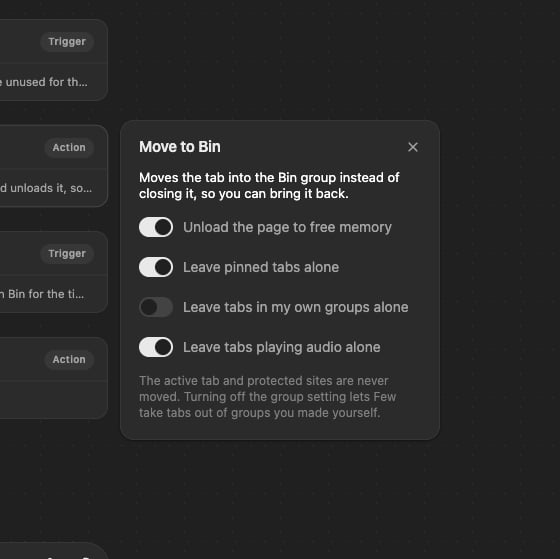 Every timing in Few is set this way — how long a tab must be unused, how long it
stays in Bin, how long before a duplicate is closed.
## Blocks
**Unused for** — the tab has gone untouched for a length of time.
**In Bin for** — the tab has been sitting in Bin long enough.
**Time Spent** — you have spent a total amount of time on the tab.
**Open** — the tab has just been opened, optionally matching a rule.
**Duplicate** — the same page is open in another tab.
**Schedule** — at a time of day you choose.
**Move to Bin** — the safe option: group, unload, keep.
**Close** — close the tab, with a floor for how many tabs must stay open.
**Sleep** — unload the tab without moving it.
**Notify** — a notification instead of doing anything.
**Group**, **Pin**, **Focus**, **Reload**, **Bookmark** — the rest of the
everyday tab operations.
**Condition** — branch on the tab's address, title, kind of site, age or
group, or the time and day — see below.
**Delay** — wait before the next step.
Drag a block from the toolbox onto the canvas to add it, and drag steps to
reorder them.
## Conditions
A **Condition** splits the workflow: tabs that match go down **If**,
everything else down **Else**. Add as many conditions as you like, and choose
whether a tab must match **all** of them or **any** one.
* **Kind of site** — AI, files, chat, news, shopping, video and so on. Tick several and
any of them matches. Few works this out on your device
([how](/docs/guides/grouping)); a tab it can't place matches none.
* **Title contains** — a word or phrase in the tab's title. Separate several
with commas; any of them matches.
* **Domain**, **address** — a site, or part of an address. Domains can be a
comma-separated list too.
* **Pinned**, **playing sound**, **in a group**, **the tab you're on**, **how
long it's been open**, **number of tabs**, **time of day**, **day of the
week**.
### Describe it
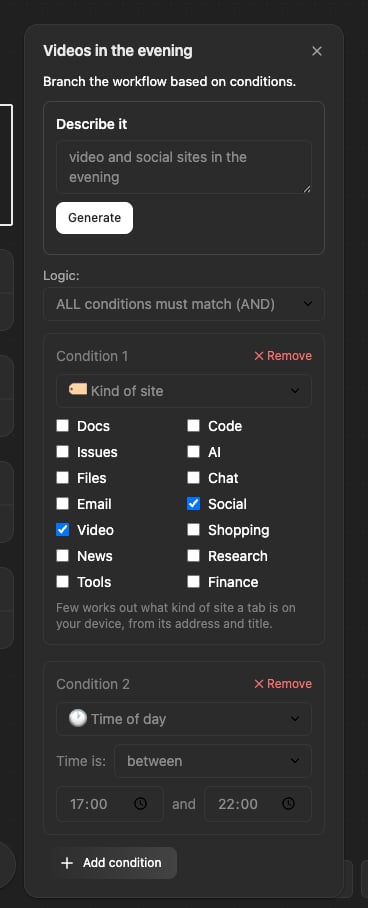
At the top of every Condition, **Describe it** drafts the conditions from a
sentence: *video and social sites in the evening*, *anything on GitHub titled
"review"*. Press **Generate** and Few fills in the list below, with a
line saying what it understood. Check it, change anything, and save as usual.
Every timing in Few is set this way — how long a tab must be unused, how long it
stays in Bin, how long before a duplicate is closed.
## Blocks
**Unused for** — the tab has gone untouched for a length of time.
**In Bin for** — the tab has been sitting in Bin long enough.
**Time Spent** — you have spent a total amount of time on the tab.
**Open** — the tab has just been opened, optionally matching a rule.
**Duplicate** — the same page is open in another tab.
**Schedule** — at a time of day you choose.
**Move to Bin** — the safe option: group, unload, keep.
**Close** — close the tab, with a floor for how many tabs must stay open.
**Sleep** — unload the tab without moving it.
**Notify** — a notification instead of doing anything.
**Group**, **Pin**, **Focus**, **Reload**, **Bookmark** — the rest of the
everyday tab operations.
**Condition** — branch on the tab's address, title, kind of site, age or
group, or the time and day — see below.
**Delay** — wait before the next step.
Drag a block from the toolbox onto the canvas to add it, and drag steps to
reorder them.
## Conditions
A **Condition** splits the workflow: tabs that match go down **If**,
everything else down **Else**. Add as many conditions as you like, and choose
whether a tab must match **all** of them or **any** one.
* **Kind of site** — AI, files, chat, news, shopping, video and so on. Tick several and
any of them matches. Few works this out on your device
([how](/docs/guides/grouping)); a tab it can't place matches none.
* **Title contains** — a word or phrase in the tab's title. Separate several
with commas; any of them matches.
* **Domain**, **address** — a site, or part of an address. Domains can be a
comma-separated list too.
* **Pinned**, **playing sound**, **in a group**, **the tab you're on**, **how
long it's been open**, **number of tabs**, **time of day**, **day of the
week**.
### Describe it
At the top of every Condition, **Describe it** drafts the conditions from a
sentence: *video and social sites in the evening*, *anything on GitHub titled
"review"*. Press **Generate** and Few fills in the list below, with a
line saying what it understood. Check it, change anything, and save as usual.
 * Site names and words in quotes are read from your sentence on your device.
Kinds of site, times, days and tab ages are drafted by our API.
* **Only the sentence is sent**, when you press the button. Your tabs are never
sent. [Privacy](/docs/privacy) has the details.
* If your sentence describes tabs to **keep**, Few says so: put the steps you
want for everything else under **Else**.
* It needs you to be signed in, with a trial or plan. Every condition can be
set by hand without it.
Put **Move to Bin** in the If branch rather than **Close**. Bin is the safety
net: if a condition catches a tab you didn't mean, it is still there to open.
## Testing before you trust it
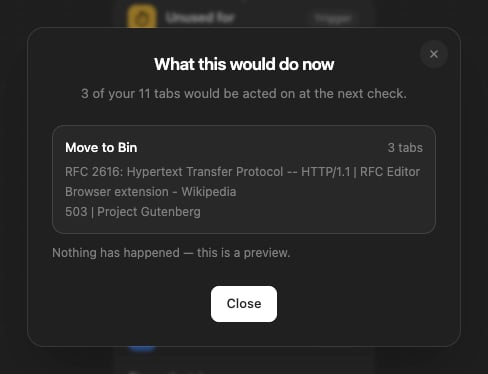
The **▷** button beside the workflow's name reports what the workflow would do
to the tabs you have open **right now**. Nothing is moved, closed or grouped —
it is a preview.
* Site names and words in quotes are read from your sentence on your device.
Kinds of site, times, days and tab ages are drafted by our API.
* **Only the sentence is sent**, when you press the button. Your tabs are never
sent. [Privacy](/docs/privacy) has the details.
* If your sentence describes tabs to **keep**, Few says so: put the steps you
want for everything else under **Else**.
* It needs you to be signed in, with a trial or plan. Every condition can be
set by hand without it.
Put **Move to Bin** in the If branch rather than **Close**. Bin is the safety
net: if a condition catches a tab you didn't mean, it is still there to open.
## Testing before you trust it
The **▷** button beside the workflow's name reports what the workflow would do
to the tabs you have open **right now**. Nothing is moved, closed or grouped —
it is a preview.
 ## Starting over
The templates button offers three ways to start. **Templates** has the
recommended cleanup, a gentler one, a more aggressive one and a duplicate
remover; **Scratch** is a blank canvas; **Describe** is below. For more — memory
savers, end-of-day tidies, rules by kind of site — see the
[workflow library](/docs/workflows): download one and bring it in with **Import**.
### Describe how you work
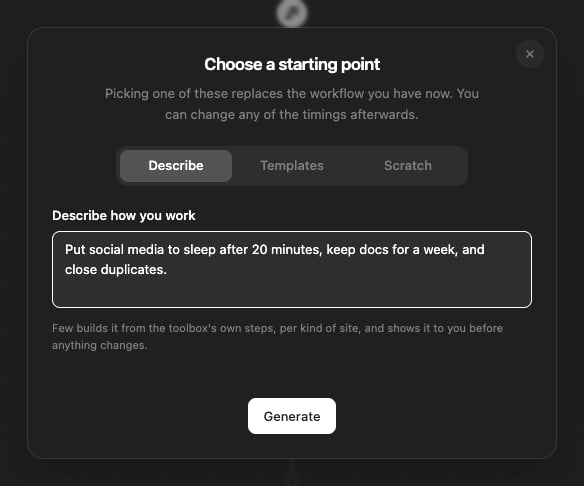
In the templates dialog, choose **Describe** and say how you'd like your tabs
handled — *put social media to sleep after 20 minutes, keep docs for a week, and
close duplicates* — then press **Generate**. Few builds a workflow from the same steps
as the toolbox and shows it before anything changes: a picture of the steps,
and a line for each kind of site. **Use this** puts it in the editor, where you
can change any of it; **Edit the sentence** lets you try again.
## Starting over
The templates button offers three ways to start. **Templates** has the
recommended cleanup, a gentler one, a more aggressive one and a duplicate
remover; **Scratch** is a blank canvas; **Describe** is below. For more — memory
savers, end-of-day tidies, rules by kind of site — see the
[workflow library](/docs/workflows): download one and bring it in with **Import**.
### Describe how you work
In the templates dialog, choose **Describe** and say how you'd like your tabs
handled — *put social media to sleep after 20 minutes, keep docs for a week, and
close duplicates* — then press **Generate**. Few builds a workflow from the same steps
as the toolbox and shows it before anything changes: a picture of the steps,
and a line for each kind of site. **Use this** puts it in the editor, where you
can change any of it; **Edit the sentence** lets you try again.
 It answers per kind of site, from a fixed set of choices: leave alone, sleep,
move to Bin, Bin then close, bookmark then Bin, or close, each after 20
minutes, an hour, a few hours, a day or a week. Anything finer, change in the
editor. As with Describe it, only the sentence is sent, and only when you
press the button.
Import checks a file before it changes anything. If a file isn't a workflow
Few can run, it says what's wrong and leaves your workflow as it was.
Picking a template replaces the workflow you have now. Export first if you
want to keep it — **Export** writes the workflow to a JSON file, and
**Import** reads one back.
## Saving
**Save** writes the workflow and starts every tab again from the first step, so
a tab that was halfway through the old rules is measured afresh against the new
ones.
It answers per kind of site, from a fixed set of choices: leave alone, sleep,
move to Bin, Bin then close, bookmark then Bin, or close, each after 20
minutes, an hour, a few hours, a day or a week. Anything finer, change in the
editor. As with Describe it, only the sentence is sent, and only when you
press the button.
Import checks a file before it changes anything. If a file isn't a workflow
Few can run, it says what's wrong and leaves your workflow as it was.
Picking a template replaces the workflow you have now. Export first if you
want to keep it — **Export** writes the workflow to a JSON file, and
**Import** reads one back.
## Saving
**Save** writes the workflow and starts every tab again from the first step, so
a tab that was halfway through the old rules is measured afresh against the new
ones.