

1. Install the extension
WithFew on the Chrome Web Store
Chrome, and Chromium browsers like Edge, Brave and Arc.
2. Start your free week
A tab opens asking for your email address. You get a sign-in link, and your seven-day trial starts when you use it — no card. Few keeps working for a week without an account, so you can try it first. After that it asks you to sign in. See Your account.3. Browse normally
Open tabs, research, compare, move on. Few watches which tabs you actually come back to.1
After 3 hours
A tab you haven’t used joins Bin — a collapsed grey group at the end of
your tab strip — and is unloaded, so it stops using memory. One notification
tells you how many moved, with Undo.
2
Any time
Open a tab in Bin and it leaves Bin and comes back as a normal tab. Nothing
to restore, nothing to remember.
3
After five days in Bin
Tabs you never came back to are closed.
4. Check on it
The number on the Few icon in your toolbar is how many tabs are in Bin; with nothing in Bin there is no number at all. Click the icon and the popup shows what is in Bin, what you have protected, and what Few has done this week.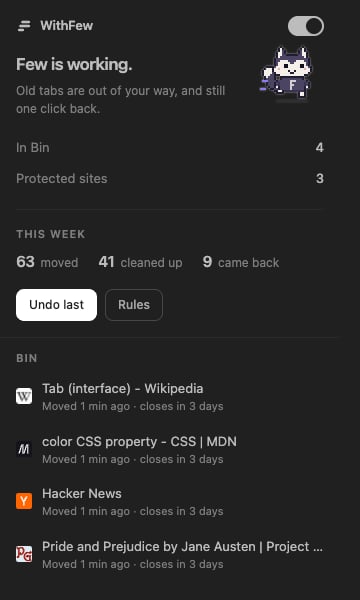
Meet Few
The little fox in the popup is Few, and it acts out what it’s doing:
The toolbar icon plays the same for a second when something happens. To turn
Few off, open Settings in the editor and switch off Show Few. If your
computer is set to reduce motion, Few stands still.
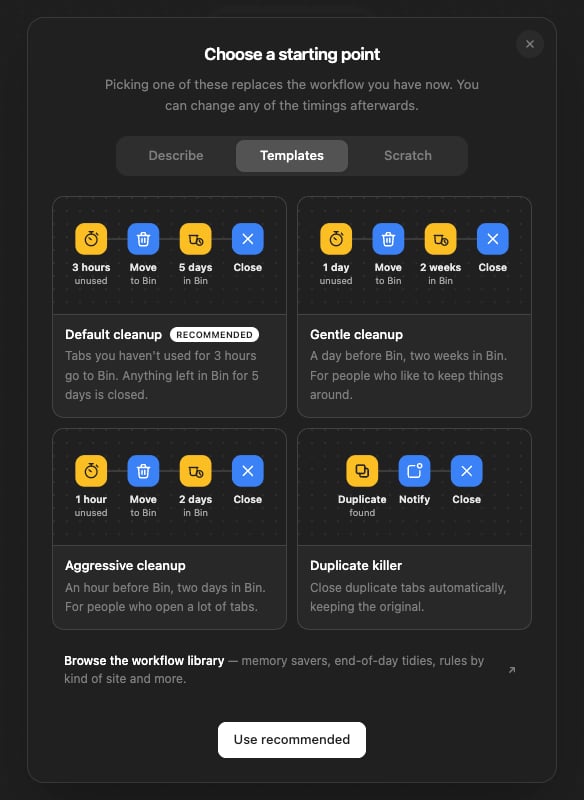
From there, Rules opens the editor, where you can change the timings or
start from a different template.
Next: the Bin
How tabs move in, come back, and eventually go.