How to save all your Chrome tabs before closing them
28 September 2026 · 3 min read
Built into Chrome
- Bookmark all tabs: Ctrl+Shift+D (Cmd+Shift+D on a Mac) saves every tab in the window into a new bookmark folder. Then close them without worrying.
- Reading list: right-click a tab and choose Add tab to reading list. It's in Chrome's side panel afterwards.
Saved automatically, just before closing
WithFew (our extension) has two ready-made workflows that bookmark tabs for you, into a WithFew bookmarks folder:
- Save before closing: tabs move to Bin after 3 hours unused, and each one is bookmarked just before it closes, 5 days later.
- Friday reset: at 17:00 on Fridays, your open tabs are bookmarked, then moved to Bin, and closed a week later.
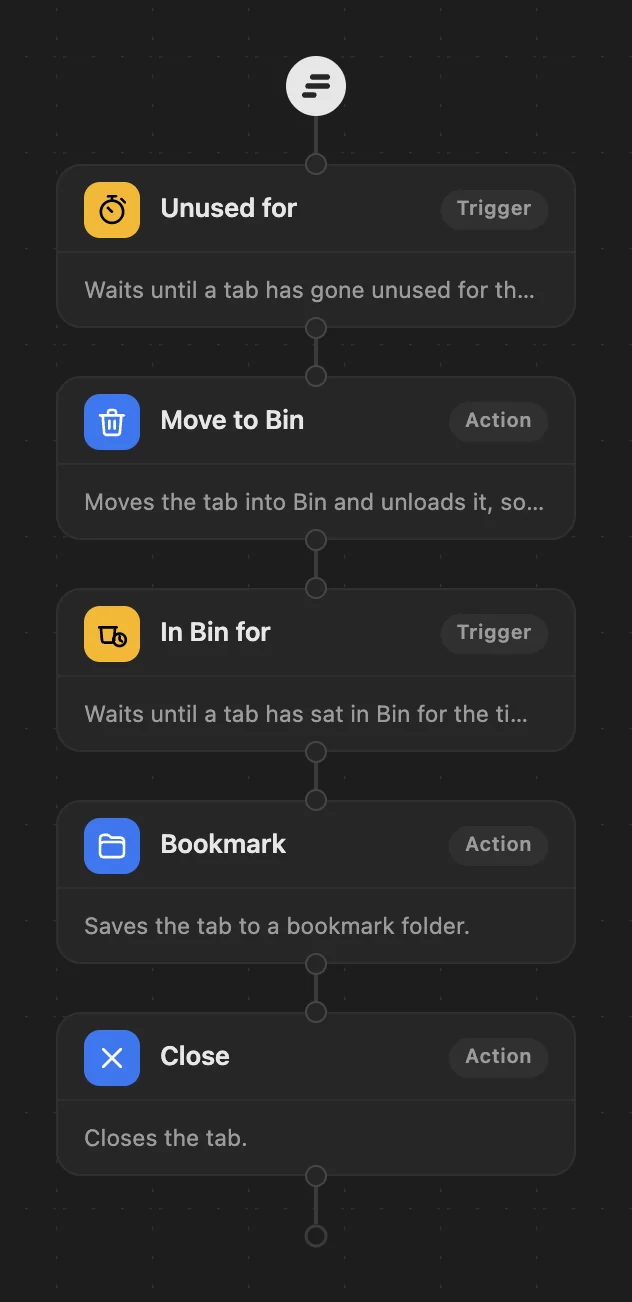
Either way nothing is ever really lost: the bookmark stays after the tab is gone. WithFew is free for 7 days, then $5 a month.