How to close duplicate tabs automatically in Chrome
28 September 2026 · 3 min read
By hand
Before opening a page again, press Ctrl/Cmd+Shift+A and type its name: Chrome's tab search finds it if it's already open. Chrome has no setting that closes duplicates.
Automatically, and nothing else
WithFew (our extension) has a ready-made workflow for exactly this: Duplicate killer. When a tab shows the same address as a tab you opened earlier, the newer one is closed and a notification says so. It does nothing else to your tabs.
Automatically, with the cleanup
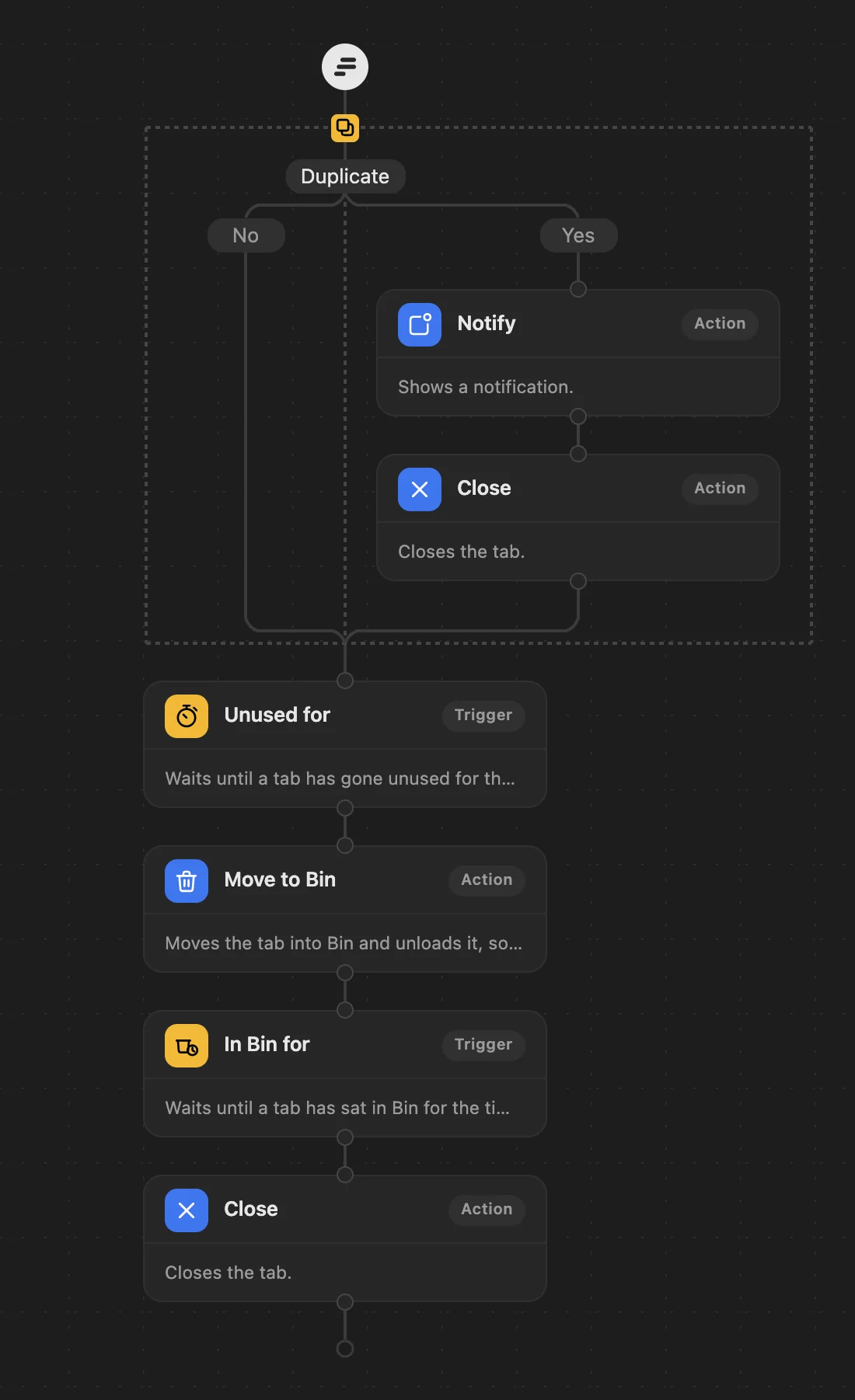
To close duplicates and keep tidying the rest, add one step to the top of your workflow in Few's editor:
- Drag Duplicate to the top.
- Into its Yes branch, drag Notify (optional) and Close.
- Click Close and set Only close if more than X tabs open to 1, and switch on Ignore pinned tabs. (A Close fresh from the toolbox waits for more than 5 open tabs and doesn't skip pinned ones.)
- Leave No empty, keep your cleanup below it, and Save.
Good to know
- A duplicate means exactly the same address. The same page with a different
#sectionor tracking tag counts as different. - The copy you opened first stays; the later ones close.
- Pinned tabs and sites you protect are never closed.
WithFew is free for 7 days, then $5 a month.