How to get a reminder after 20 minutes on YouTube in Chrome
28 September 2026 · 4 min read
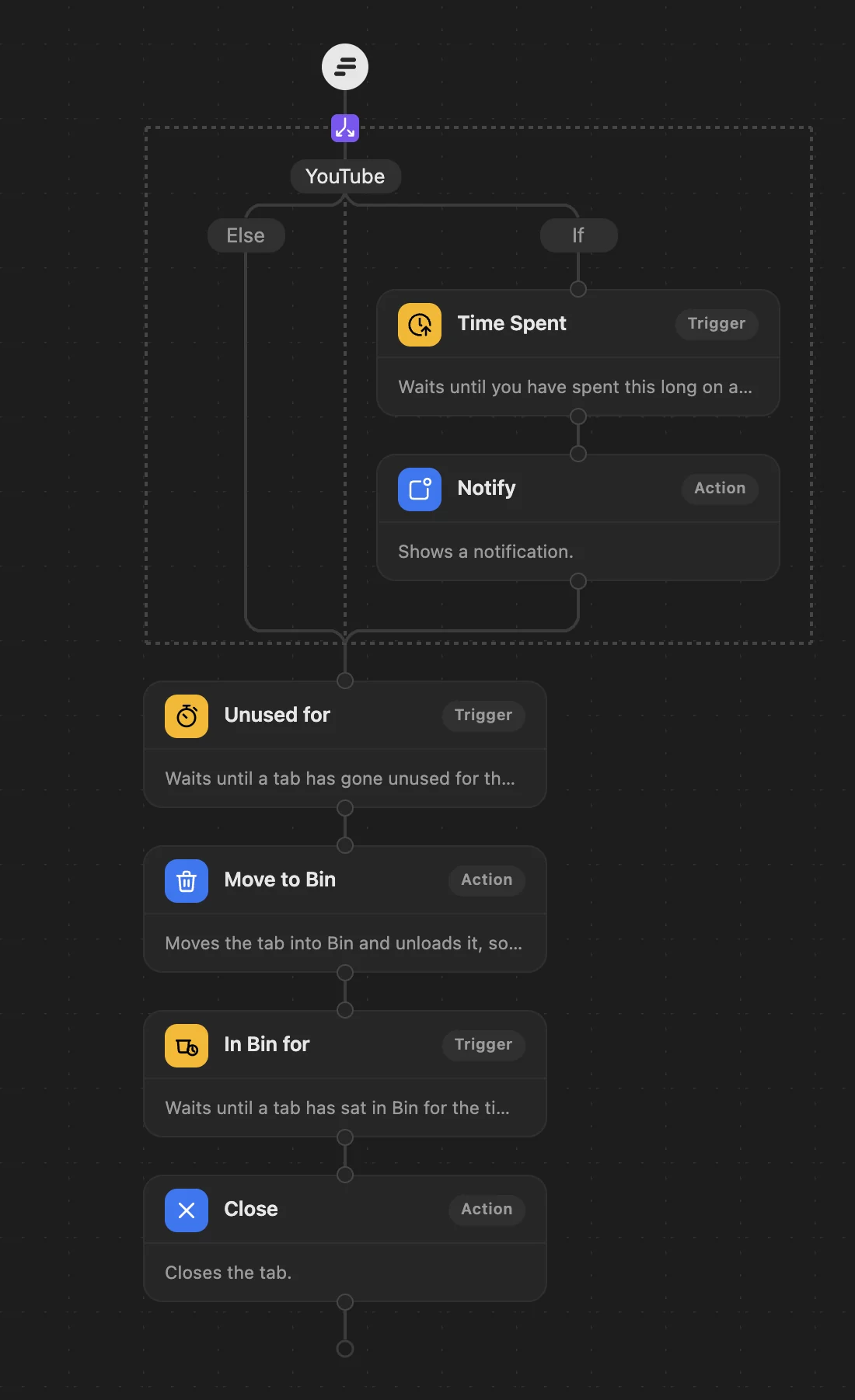
Chrome itself has no way to tell you you've been on a site for a while. With WithFew (our extension) it's three steps in its workflow editor: when a tab is on YouTube and you've spent 20 minutes on it, you get a notification.
Build it
Open Few's editor (click Few in Chrome's toolbar, then Rules), and:
- Drag a Condition to the top of your workflow, and add a Domain condition:
youtube.com. - Into its If branch, drag Time Spent and set it to 20 minutes.
- Under it, drag Notify and write your message: "20 minutes on YouTube."
- Leave Else empty, keep your cleanup steps below the Condition, and Save.
How it behaves
- It counts the time you actually spend on that tab, across every visit to it, not time it sits in the background.
- After 20 minutes you get a notification. Come back to that tab later and it reminds you again.
- Every other tab carries on with your usual cleanup.
- A YouTube tab only moves on to the cleanup once it has had its reminder, so a video you left after five minutes isn't tidied away by this workflow. If you want those unloaded too, the Social timeout workflow puts social and video tabs to sleep 20 minutes after you leave them.
WithFew is free for 7 days, then $5 a month.