Create Chrome tab workflows with Claude Code, Codex or any AI agent
28 September 2026 · 5 min read
WithFew (our extension) runs your tabs through a workflow: a chain of steps like "unused for 3 hours → move to Bin → close 5 days later". A workflow is a small file, so an AI coding agent can write one for you. The withfew skill teaches it how: which steps exist, how Few actually runs them, and the mistakes that look right but don't work. It checks every file the way Few's Import does before it hands it over.
Install the skill
npx skills add davmixcool/skills --skill withfew -gThat works for Claude Code, Codex, Cursor, OpenCode, Windsurf, Cline and other agents that use skills, and needs Node 20.12 or later. Leave out -g to install it into the current project only. For Claude Code without npx, copy the skills/withfew folder from github.com/davmixcool/skills into ~/.claude/skills/.
Ask for what you want
In plain words, the way you'd tell a person:
Make me a WithFew workflow: close Reddit and X tabs after 30 minutes
unused, keep GitHub tabs for a week, everything else as usual.
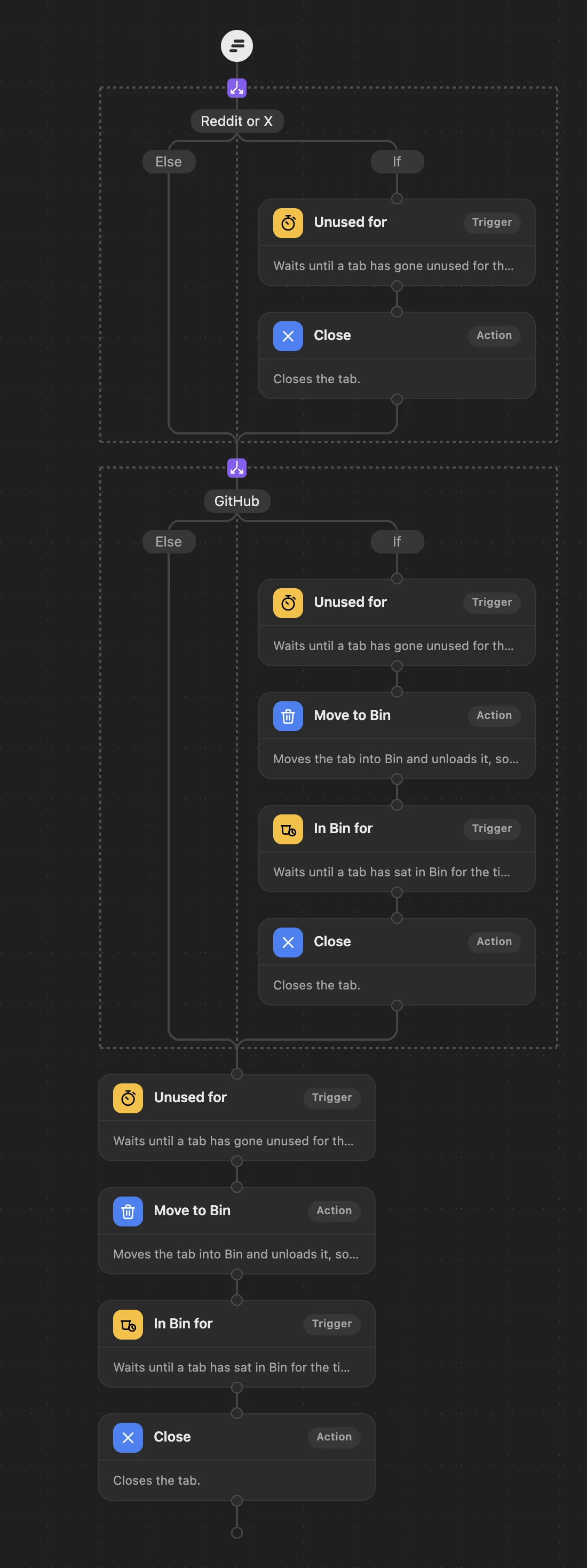
The agent writes the workflow file, checks it, and reads it back to you as an outline:
sites-each-their-own.json: OK
  1. Condition: site is reddit.com or site is x.com or site is twitter.com
     If:
        1. Unused for 30 minutes
        2. Close
     Else: (nothing: carries on below)
  2. Condition: site is github.com
     If:
        1. Unused for 7 days
        2. Move to Bin
        3. In Bin for 5 days
        4. Close
     Else: (nothing: carries on below)
  3. Unused for 3 hours
  4. Move to Bin
  5. In Bin for 5 days
  6. Close
The check is Few's own: the same validator Import uses, built from the extension's code, plus the things Import accepts but that wouldn't do what they look like (a step after Close, a schedule inside a branch, a condition that can never be true). The agent fixes those before you see the file.
Import it into Few
- Click Few in Chrome's toolbar, then Rules.
- Click Import at the bottom right of the editor, and choose the file.
- Check the diagram, then Save.
The steps replace your current workflow; your protected sites and grouping settings stay as they are. Every step can be changed in the editor afterwards.
Things to ask for
- "Put YouTube and Netflix to sleep after 20 minutes; tidy everything else as usual."
- "Tell me when I've spent 20 minutes on a YouTube tab."
- "During work hours on weekdays, put video tabs to sleep after 10 minutes."
- "At 6pm on weekdays, move everything I'm not using to Bin."
- "Open my mail and calendar at 9 every weekday."
- "Close duplicate tabs, and bookmark everything before Few closes it."
- "Keep docs and code tabs for a day, everything else 3 hours."
- "Look at my WithFew workflow file and tell me why YouTube tabs never close."
The skill carries a pattern or a ready-made workflow close to each of these, all of them checked with Few's own validator before they're published, and the agent starts from the closest.
What it won't do
- Touch your browser. The agent writes a file; you import it. Nothing about your tabs goes to the agent unless you paste it in.
- Promise what Few can't do: read what's on a page, measure a tab's memory, or limit time on a site per day. The skill tells the agent to say so rather than approximate.
WithFew is free for 7 days, then $5 a month. The skill is free and open source.